
Elephant Insurance Mobile
Elephant InsuranceAuto & Vehicles
3.851.00 Reviews
- Version
- 1.6.5
- Installs
- 10.00K
- Age Rating
- Everyone
Screenshots

Our Review of Elephant Insurance Mobile
 Analysis by Appyee
I installed Elephant Insurance Mobile to see how useful it feels when the thing you need is not a quote or a sales pitch, but quick access to your existing car insurance information. Developed by Elephant Insurance, this free Auto & Vehicles app is built around a simple promise: keep your auto policy within reach when you are away from a desktop browser. That focus makes it easier to judge than a feature-heavy finance app. The question is not whether it replaces every insurance task, but whether it reduces the small moments of friction that happen when you need policy information at the roadside, at home, or while dealing with paperwork.
My overall impression is practical rather than exciting. The app is aimed at Elephant customers who want a mobile route into their policy account. It is available for Everyone, runs on Android eight or later, and has reached over ten thousand installs. Its current version is 1.6.5, while its Google Play average sits at 3.8 from around one hundred ratings and more than fifty written reviews. Those figures suggest a useful but not universally smooth experience, which matches the way I would approach it: worthwhile if you already use Elephant Insurance, but not an app I would install without a reason connected to that insurer.
What Elephant Insurance Mobile is really for
The most important distinction is that this is an account-access tool, not a general driving companion. I would not approach it expecting navigation, fuel-price comparisons, vehicle maintenance advice, or a broad marketplace for insurance products. Its place is much narrower: it gives Elephant policyholders a mobile way to reach their auto insurance details instead of relying entirely on a computer or searching through old messages.
That narrow purpose is a strength when your need is equally narrow. Insurance information tends to be most valuable at inconvenient times. You may be standing beside a car after a minor incident, completing a form that asks for policy details, checking information before lending the vehicle to someone in your household, or trying to confirm that you are looking at the right account. In those moments, a dedicated insurer app can feel more direct than opening a browser, finding the correct site, and working through a desktop-oriented account page.
I also like the fact that the app’s identity is clear. The developer is Elephant Insurance, so the service is not trying to be a neutral insurance wallet that gathers policies from several companies. That means its usefulness depends heavily on whether Elephant is your insurer. For an Elephant customer, the branding should make the purpose obvious. For somebody insured elsewhere, there is no practical reason to treat it as a general-purpose auto app.
Free access changes the value calculation
Elephant Insurance Mobile is listed as free. That matters, but it needs to be interpreted correctly. Free installation does not automatically mean that insurance itself is free, that a policy costs less through the app, or that every account service has no separate conditions. What the free price establishes is that there is no listed purchase price for downloading and using this mobile access point. I would judge its value as a convenience attached to an existing insurance relationship, not as a standalone product that replaces the cost of coverage.
That distinction prevents a common mistake. If you are comparing insurers, the app should not be the reason to choose a policy by itself. Coverage, exclusions, claims handling, renewal terms, and the total cost of insurance matter far more than whether an account has a mobile interface. On the other hand, if you have already chosen Elephant, free access makes the decision easy: there is little downside to trying the official app, provided your device meets the Android requirement and you are comfortable managing policy information on a phone.
I would also avoid assuming that a free app guarantees a completely frictionless experience. You may still need your account credentials, a stable connection, and patience if an account page does not load as expected. The absence of a download fee removes one barrier, but it does not remove the need to keep your login details secure or to verify important information before relying on it in a stressful situation.
Where the app can save time in ordinary life
The strongest use case is the everyday policy check. Imagine that I am preparing for a weekend drive and need to confirm details before leaving. Instead of looking for an insurance email or opening a laptop, I can try the mobile account first. That is a small saving, but these small savings add up because insurance questions tend to appear when I am already busy: before a journey, after changing a vehicle-related detail, or while completing a form.
A second useful scenario is handling a minor incident. I would not treat the app as a substitute for emergency services, professional advice, or the insurer’s formal claims process. Still, having a familiar account entry point on the phone can help me begin with the right policy context rather than relying on memory. The practical benefit is organization: I can keep the insurer’s official route close at hand instead of improvising a search when emotions are running high.
There is also value for people who share responsibility for a vehicle. A household member may ask for policy information while the main policyholder is away from a computer. A mobile app is easier to carry than a folder of documents, and it encourages a habit of checking current information rather than saving an old screenshot. My advice is to treat the app as a place to access current account information, not as an excuse to keep outdated copies elsewhere and assume they remain accurate.
Three practical habits that make it more useful
First, I would sign in and explore the account before an urgent need arises. The worst time to discover that you have forgotten a password or that your account needs an extra verification step is beside a damaged vehicle. A calm first visit lets you understand the route to your policy information and decide whether you need a separate secure note for non-sensitive reminders, without exposing private details unnecessarily.
Second, I would use the app as a verification checkpoint rather than copying information blindly. When entering policy details into another form, compare the relevant fields carefully and check that the vehicle and account context are correct. This is especially useful in households with more than one car or more than one person who deals with insurance. The app’s real advantage is current access; that advantage disappears if I continue using an old saved document without checking it.
Third, I would prepare an offline backup plan for situations where mobile access may be inconvenient. An app is helpful when the phone is charged and the connection works, but a roadside situation can involve poor signal, a damaged device, or limited time. I would keep only the information I genuinely need in a safe, privacy-conscious format and use the app to confirm it regularly. That is a better workflow than treating any single screen as the only possible source of important insurance information.
The trade-off between simplicity and breadth
The focused design is also the main limitation. If you want one app to manage policies from several insurers, compare competing quotes, organize fuel receipts, track maintenance, and handle broader vehicle ownership tasks, this is not the right category of tool. A multi-provider insurance wallet or a general vehicle-management app may be more convenient for that wider job, although it may not offer the same direct connection to Elephant.
There is a similar trade-off between mobile convenience and a larger screen. A phone is ideal for a quick check, but longer forms, detailed reading, or complicated account work can be more comfortable in a browser on a laptop. I would use the app for immediate access and routine checks, then switch to a larger screen when the task becomes document-heavy or requires careful comparison. That is not a failure; it is a sensible division between a pocket tool and a full account workspace.
The average rating of 3.8 indicates that the experience is mixed enough to deserve realistic expectations. I would not read that number as proof that the app is unusable, nor as a guarantee that it will behave perfectly on every phone. Account apps are particularly sensitive to login problems, device compatibility, connection quality, and changes in back-end services. If access is essential, I would keep the official customer-service route or browser account available as a fallback rather than depending on one interface alone.
Who will get the most value from it?
The clearest audience is an existing Elephant auto-policy customer who prefers handling routine information from a phone. The app makes the most sense for someone who travels regularly, dislikes searching through email for policy documents, or wants an insurer-specific account entry point available outside the home. It is also a reasonable choice for people who are comfortable with mobile account management and want to check information immediately instead of waiting until they can reach a computer.
It may be particularly useful for a busy driver who deals with practical tasks between work, errands, and family commitments. In that situation, the value is not a dramatic new capability. It is the ability to deal with a small insurance question during a gap in the day. Free access strengthens that case because trying it does not require a separate app purchase.
I would be more cautious if you are not an Elephant customer, if you rarely use a smartphone for account services, or if you expect the app to compare the whole insurance market. It is also not the best fit for someone who wants a rich driving dashboard rather than policy access. Those users should look toward the insurer they actually use, a browser-based account, or a broader vehicle-management product, depending on the task.
What to consider before relying on it
Before making it part of my routine, I would check three things. The first is device compatibility: the app requires Android eight or later, so an older phone may not be suitable. The second is account readiness: I would make sure I know the correct login details and can reach the relevant policy information without rushing. The third is backup access: I would keep a second way to contact Elephant or reach the account for moments when the app is unavailable.
I would also be careful about privacy in shared-device situations. Insurance accounts can contain information that should not be casually left open for another person to view. Logging out when appropriate, using the phone’s own security features, and avoiding screenshots of sensitive pages are sensible habits. These are not reasons to avoid the app; they are part of using any insurer account responsibly on a mobile device.
One further trade-off is that convenience can encourage overconfidence. Seeing an account screen does not necessarily answer every question about coverage, responsibility, or what to do after an incident. I would use the app to locate and review policy information, then follow the insurer’s proper instructions for anything consequential. The mobile interface is a starting point for informed action, not a replacement for understanding the policy itself.
My verdict on installing it
I would recommend Elephant Insurance Mobile to Elephant customers who want a free, official way to reach their auto policy from an Android phone. Its value is practical and situational: it can reduce the time spent hunting for insurance information and give you a more convenient account habit. The app is not trying to be a complete motoring toolkit, and I think it is better judged for that focused role than criticized for not being something else.
My recommendation comes with a clear condition: keep an alternative route available for urgent or complicated matters. The middling 3.8 average suggests that not every user will have an equally smooth experience, and a mobile account should never be your only preparation for a roadside problem. Try it during a quiet moment, confirm that it works comfortably on your phone, and decide whether it is dependable enough for your routine.
For me, the final decision is simple. Elephant Insurance Mobile is worth trying when you already insure your car with Elephant and want convenient policy access without paying for the app itself. I would skip it if I am looking for insurance comparison, multi-provider management, or advanced driving tools. In that narrower, honest sense, it delivers useful value: not a reason to buy insurance, but a sensible companion for people who already have an Elephant policy and want it closer at hand.
Verdict
Strengths of Elephant Insurance Mobile
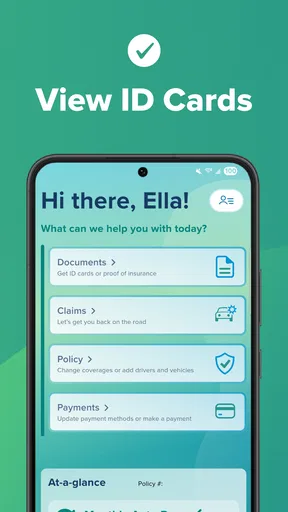
- Quick access to policy details, documents, and coverage information
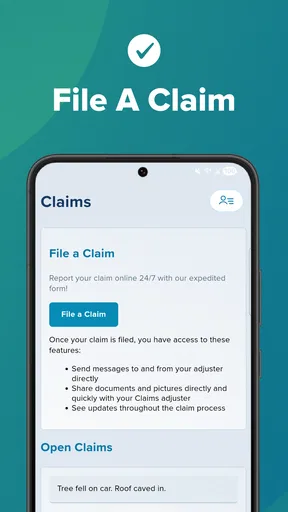
- In-app tools can simplify claims reporting and status tracking
- Digital ID cards are convenient when driving or handling roadside checks
- Secure login helps keep personal and insurance information protected
- Useful account management without needing to call customer service
Limitations of Elephant Insurance Mobile
- Some features may be limited depending on your policy or state
- Claim updates can still require follow-up with an insurance representative
- App performance may vary after updates or on older devices
- Not all policy changes can necessarily be completed inside the app
- Requires an active Elephant Insurance account to access most functions
Similar Picks in This Category
View All
Android Auto
Google LLC4.1

maxim — order a taxi & food
PT. SITO4.7

Штрафы ГИБДД: проверка с фото
Pays LLC – Штрафы ГИБДД4.7

Номерограм – проверка авто
Авто Ассист4.8

Дром Авто
Дром4.9

Frequently Asked Questions
What is Elephant Insurance Mobile used for?
Elephant Insurance Mobile is designed to help policyholders manage their car insurance from a smartphone. After signing in, you can typically review policy information, check documents, view payment details, make or schedule payments, and access support. Depending on your policy and region, the app may also provide tools for reporting or managing a claim, making it a convenient alternative to using the insurer’s website or calling customer service.
Can I use Elephant Insurance Mobile to make a claim after an accident?
The app may allow eligible customers to start or manage a motor insurance claim, although the exact options can vary by policy, location, and the type of incident. Before submitting anything, make sure you have the relevant accident details, photographs, vehicle information, and contact details for other parties. In an emergency or when someone is injured, contact the appropriate emergency services first rather than relying only on the app.
Can I make an insurance payment through the app?
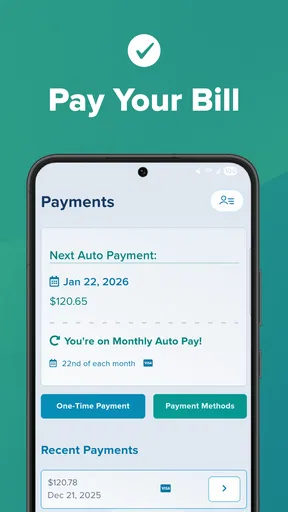
Elephant Insurance Mobile generally provides access to payment-related services for eligible policyholders, such as viewing balances, checking upcoming payment dates, and making a payment using an accepted method. Availability can depend on your account setup and policy terms. Review the confirmation carefully after completing a transaction, and do not assume that installing the app or opening the payment screen automatically changes your payment schedule.
Is Elephant Insurance Mobile safe for managing my policy information?
The app is intended to provide secure access to personal insurance and vehicle information, but users should still take normal precautions. Download it only from the official Google Play Store or Apple App Store, verify the developer details, keep the operating system updated, and use a strong account password. Avoid signing in on public or shared devices, and contact Elephant through official channels if you notice unfamiliar account activity.
Do I need to be an Elephant Insurance customer to use the app?
Most of the useful functions in Elephant Insurance Mobile are intended for existing Elephant Insurance customers with an active policy or registered online account. You may be able to install the app and view introductory information without a policy, but policy management features normally require authentication. If you are considering a quote, changing coverage, or checking eligibility, the available options may direct you to Elephant’s website or customer support.
